
Complete your count
Count your cash with Monetec solutions and add other payment types as needed.
A cash-register result is useful when you can work with it. With Monetec, send a count as an Excel-compatible CSV directly from your Android app.
A simple action built into the Monetec app.
Count your cash with Monetec solutions and add other payment types as needed.
On the main screen, use the Share button to generate a file for the current count.
The standard Android sharing menu lets you select a compatible app to send or save the file.
Monetec creates a CSV file containing the count results. Open it in Microsoft Excel or another compatible tool to review, analyse and archive your data.
Depending on your Excel settings, you may need to adjust the CSV delimiter or encoding during import.
Monetec produces a CSV file for each shared count.
The file can be sent, stored or opened later in a spreadsheet.
Bluetooth, messaging, email or storage: available options depend on the apps installed on your device.
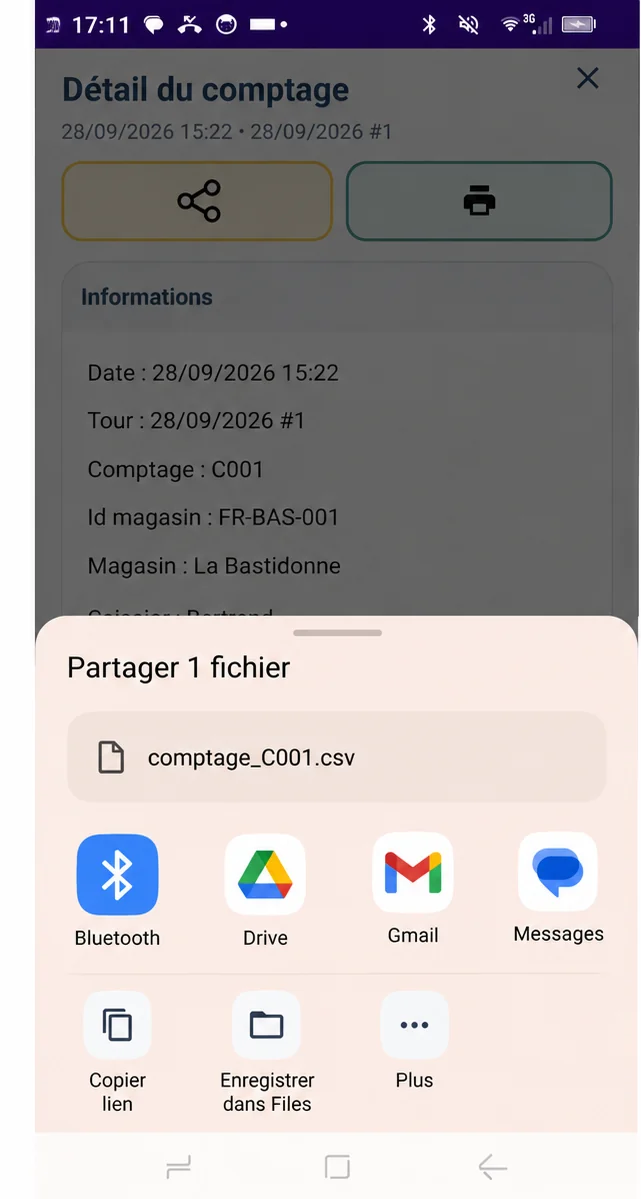
Monetec opens Android's standard sharing feature. You then choose the app and recipient, without being tied to any particular sending service.
Manual sharing works from the current count's main screen and from the details of an earlier count saved in history.
The Share button on the main screen compiles the count and prepares its CSV export. You can send the results without opening history.
Open a saved count and use its Share button to export the details again as CSV.
Manual CSV sharing complements Monetec's tracking features. Automated distribution and centralisation features are described separately under Premium and Cloud solutions.